
Tag: online sales

  • Build your own Creator Portfolio Website in 1 hour

    Build your own Creator Portfolio Website in 1 hour

    While it’s perfectly okay in 2023 to have a creator-based business hosted on your social media platform, to truly turn your passion into a professional profitable venture, you’re going to need to have your own online home.

    Elevating your personal brand also includes ditching the Gmail, Yahoo, and free email domains and getting a personalized one with your name and everything.

    In this post, I am going to show you how you can have your own domain and your own website and even have your own social media links page which will host your portfolio, rate cards and it’s going to look great and polished.

    Go from amateur to professional

    When you first start partnering with other companies, brands, and services, one of the things you’ll have to show them is your portfolio. Many times, creators and influencers combine their media kits or rate cards into one document and send it as a PDF or link to a portfolio created and hosted in Canva or some other platform.

    While those methods of sharing your work are totally acceptable, they still will relay to the recipient that you’re a hobbyist. It may come across as if you’re not that invested in your brand or role as a creator.

    Certainly, you could use an agency’s platform but then, you don’t know that agency and if you decide to part ways, you would have left your creative portfolio with them as well.

    For new and veteran creators, cost may be an issue but in 2023, there are lots of desktop and smartphone apps that will host your portfolio. Some of the apps I have used include Sociatap and Linktree.

    However, on those platforms, all of the traffic that goes to your linked pages from your social media accounts is owned by those companies.

    Own your Own Piece of the Internet

    You control more of your brand by hosting your own portfolio and having a personalized domain that you own.

    For example, my name is JayJay Ghatt, and I have jayjayghatt.com. The domain can be used to host your own links like LinkTree. I have two: jayjayghatt.com/links and jayjayghatt.com/social.

    You can start by purchasing your own Domain

    I have used several hosts over the years. GoDaddy has great customer service but is a little bit more costly, and Hostgator has one of the lowest costs for hosting but has less accessible support.

    A great intermediate between the two I have found is DreamHost .

    To get your own domain, create an account and click on: https://www.dreamhost.com/hosting/

    For $15 a month (2023), you can host a website with your own domain, an email address, and unlimited traffic. You can also get your bandwidth and the free SSL certificate.

    You however must remember to install it after purchase.
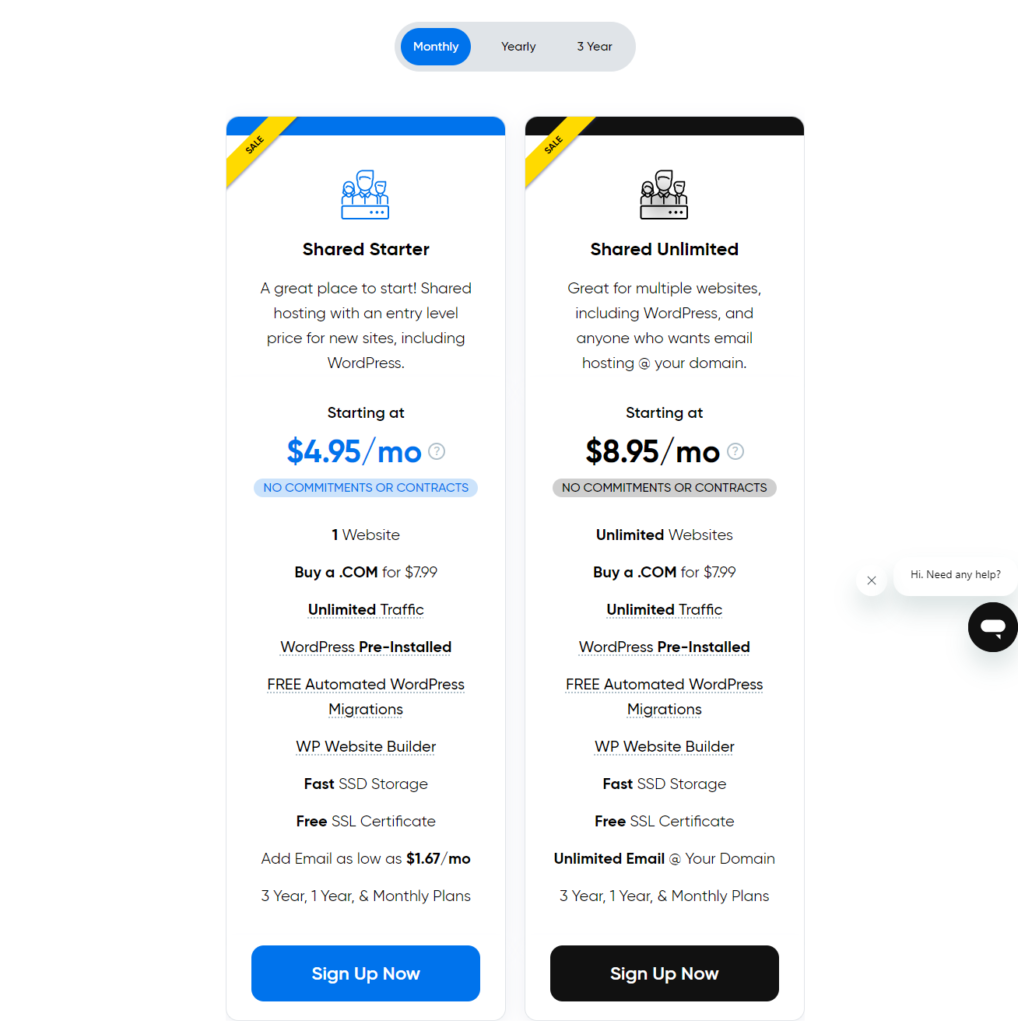
    Image on www.jayjayghatt.com on Build your own Creator Portfolio Website in 1 hour

    Importance of SSL Certificates.

    If you do not install the SSL Certificates, you will have the HTTP without the ‘S‘. This means anyone who comes to your site will get a block. With the ‘S’, Google will now serve your content, your video, or your website.

    Email Addresses with your own Domain

    I think it is important to have an email address with your own domain if you want to be taken seriously in business. It also adds a layer of credibility and authority.

    For me, instead of having a jayjayghatt@gmail account, I have a create@jayjayghatt.com get or hire@jayjayghatt.com.

    Importance of a Website Builder

    The Website Builder allows you to migrate your website over to this new Dreamhost account in case you have a WordPress website hosted someplace else.

    If you who are starting out, you only need the shared starter account. Dreampress is a little more complicated and if you have less than 100k monthly visitors you don’t need this level of hosting.

    Save money by opting for yearly plans

    Now there’s going to be a cost-benefit for opting for a yearly plan.

    When you switch to the yearly plan, the price goes up, but that’s okay because you’ll get a free domain.
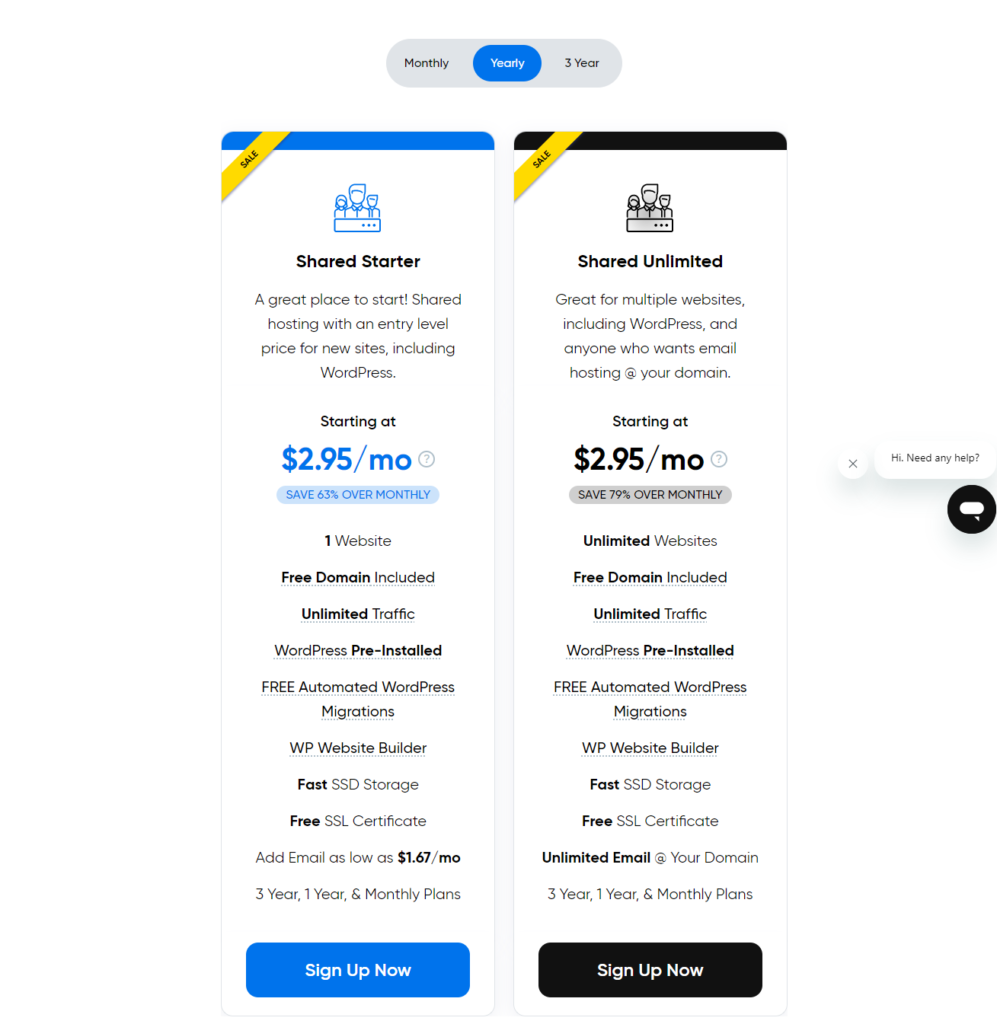
    Image on www.jayjay.com on a blog post on how to set u you

    I highly recommend you consider this option. Let’s say if were to sign up for this option, with a free domain included, I’d be paying today $35.40 for a website for four years, that includes my domain.

    In my video example above, I added https://gabrielleghatt.com/. With that option, I get domain privacy, which is free which means that people don’t know your personal information as the host.

    Domain Privacy

    There are people who are like domain poachers. What they do is, wait for popular established domains to expire and then grab them and hijack them. They then shake down the original owner for thousands of dollars to get it back.

    Let’s say a year passes and you’re not checking your email or you’re out of town or you’re out of the country and you get an email stating that gabrielleghatt.com, for example, is about to expire. If I don’t respond within a set amount of time, these poachers will come and try to take that domain especially if I’ve already made something of the domain and made it popular.

    With domain privacy, DreamHost will give you extra time and will go above and beyond to try to contact you to renew your domain.

    How to Install WordPress

    If you have the option to pre-install WordPress, select it.

    What happens is that it is going to connect your domain automatically to WordPress and install WordPress for you.

    That’s amazing! It saves you the stress of messing up especially if you are not a highly technical person.

    When you click on the “click to install” option, the hosting will be set up for you ready for customization. Once you install your theme, you will have a nice website. WordPress themes have a whole collection, they’re all free, so you don’t even have to purchase one.

    Click here for a step-by-step walkthrough on how to change your website’s design, color palette, background, photos, and more.


  • Mastering the Art of Online Sales: A Step-by-Step Guide to Selling Digital Products and Services

    Mastering the Art of Online Sales: A Step-by-Step Guide to Selling Digital Products and Services

    Image on www.jayjay.com on Mastering the Art of Online Sales: A Step-by-Step Guide to Selling Digital Products and Services

    This will be a comprehensive overview on everything you need to know to sell digital or real products online. (Some of the links in this post are affiliate links. I get a commission if you choose to make any purchase)

    Not everyone is aware of this fact but most content creators do not necessarily earn a living from ads, creator reward funds or bonus programs or even from brand deals.

    A good portion of the most successful online entrepreneurs, including those who consider themselves to be creators, make most of their money from selling products online.

    These products can be physical or digital, and they can be offered by the creator themselves, or promoted as an affiliate of someone else’s product or service for a commission on each sale.

    If you are interested in selling online, here are the steps you will need to undergo.

    Image on www.jayjay.com on Mastering the Art of Online Sales: A Step-by-Step Guide to Selling Digital Products and Services

    A. BEFORE YOU CREATE YOUR PRODUCT TO SELL

    1. Market Research

    First, you need to create a product that people want to buy. This could be an ebook on a popular topic, a course that teaches a valuable skill, or software that solves a common problem.

    But first thing you need to determine if there is a need or interest in your product and service. You can do that by conducting research on competitiors, check out online marketplaces like Etsy, ClickBank and Udemy to see who is offering products similar to what you want to offer and you can usually see their sales. This insight will give you a good understanding on whether or not your product will sell.

    Do not make the mistake I made as to spend months creating intensive programs, recording video, pulling together curriculum and then getting little to no sales. Don’t waste time making a product YOU like without first determining if there is an actual market for it.

    2. Price Research

    Part of your research should include collecting insights on how to price your product. Avoid advice to start at a high price point. Unless you already have an established authority or brand in the industry or you have done the legwork and have deciphered that the value of the knowledge in your products, courses or materials is very high and that there is few competitiors out there offereing similar product. If demand outnumbers products then you can make a play there too with a high ticket.

    Without conducting this research first, you may price yourself out of the market or you may price your product so low that it is be perceived to not have value. Also, you don’t want to short change yourself by pricing too low. There is a fine balance. There is such a thing as Product Pricing coaches out there who help their digital creator, coaching and business clients figure out how to price their products.

    3. Establish Authority or Credibility

    You will also need to lay some groundwork in establishing your authority or credibility in the space you are in. You can do this through an active social media account or online presence where you add regular and consistent value through posts. If you have managed to grow a significant following during this process that’s clutch! Why? Because you would have already established and active and engaged audience that would be more amenable to purchasing your offer.

    You can also establish authority by creating a YouTube channel, podcast or blog. The more you post or share on the topic, and your content gets discovered in search or by word-of-mouth, the better your odds of selling.

    Image on www.jayjay.com on Mastering the Art of Online Sales: A Step-by-Step Guide to Selling Digital Products and Services

    You can also use your email list to share value and promote your expertise and knowledge.

    If you have the ability to do guest post, or show up on other people’s platforms such as a podcast, Clubhouse club or television show, do it!

    Getting the endorsement from an established authority in your brand is a fast hack to crediblity.

    Image on www.jayjay.com on Mastering the Art of Online Sales: A Step-by-Step Guide to Selling Digital Products and Services

    B. DECIDE WHAT TO SELL

    Once you’ve laid the ground work, the next step is to decide what to sell. I’ll share these in order of least time intensive to more rigorous to create.

    1. Digital Products.

    Digital products can include something simple as a template, workbook, ebooks, and more. They are a great way to generate income because they are relatively easy to create and can be sold to a large audience.

    You can use online services like Canva which has over 10,000 templates and is free. I highly recommend you consider purchasing the pro level because for the cost of a daily latte for a month, you get custom branded colors, access to over 1M high quality vectors, lifestyle photos and the ability to add a team, in case you work with VAs (virtual assistants) or interns.

    Image on www.jayjay.com on Mastering the Art of Online Sales: A Step-by-Step Guide to Selling Digital Products and Services

    START CANVA FREE

    2. Courses and Coaching

    Instead of selling your knowledge in a digital format, you can offer on-demand courses, consulting and coaching services. There are a lot of different platforms out there that you can use to sell your course. Kajabi, Thinkific and Teachable are among the most popular.

    I sell my courses via Teachable and love that it collects a nominal fee, is reasaonbly priced, manages your affiliates, allows you to drip content, bundle products, create upsells and more! It has great templates and look professional. You can also sell your coaching services using Teachable.

    Try TEACHABLE!

    If you don’t already have a website, you should create one because it’s still the most valuable asset you’ll have for your business and builds credibility.

    I created a blog post and YouTube video that walks you through setting up a website in one hour yourself here.

    Image on www.jayjay.com on Mastering the Art of Online Sales: A Step-by-Step Guide to Selling Digital Products and Services

    C. SELECT A PLATFORM

    Outside of courses, once you have created your stand alone product, you need to find a way to sell it.

    When choosing a platform to sell digital products, there are a few things you should consider:

    • The platform’s fees: Some platforms charge fees for selling digital products, while others do not.
    • The platform’s features: Some platforms offer more features than others, such as the ability to create a sales page or track your sales.
    • The platform’s user base: Some platforms have a larger user base than others, which can help you reach more customers.

    There are many different platforms that you can use to sell digital products. Some of the most popular platforms include:

    • Shopify: Shopify is a popular eCommerce platform that allows you to create an online store and sell digital products.
    • Etsy: Etsy is a marketplace for handmade and vintage goods, but it also allows you to sell digital products.
    • Amazon: Amazon is the world’s largest online retailer, and it also allows you to sell digital products through its Amazon Marketplace.
    • ClickBank: ClickBank is a marketplace for digital products that allows you to sell products without having to create your own website.
    • Gumroad: Gumroad is a platform that allows you to sell digital products directly from your website.

    You can also sell your products directly from your own website.

    But when you just are starting out, I recommend you use the simplest platform.

    For me, that has been Etsy and Gumroad. Both have a simple easy to use interface and they do all the work for your. Collect the fee, calculate taxes, provide special codes, coupons and more.

    Image on www.jayjay.com on Mastering the Art of Online Sales: A Step-by-Step Guide to Selling Digital Products and Services

    CREATE AN ETSY ACCOUNT HERE | START WITH GUMROAD

    They usually charge a small transaction fee for each sale but it’s worth it because of the headache they save you from having to do all of that yourself.

    No image on www.jayjay.com on Mastering the Art of Online Sales: A Step-by-Step Guide to Selling Digital Products and Serviceslt text provided for this image

    D. CREATE A SALES PAGE

    When you are selling digital products, it is important to create a good sales page. A sales page are usally a web page that is designed to sell a product or service.

    Your sales page should explain what your product is, why people should buy it, and how they can buy it. You should also include a strong call to action, such as “Buy Now” or “Sign Up.”

    It is usually a standalone page that is not part of a website’s main navigation.

    Sales pages typically include the following elements:

    • A headline that grabs attention and introduces the product or service
    • A description of the product or service, including its features and benefits
    • Testimonials from satisfied customers
    • A call to action that encourages visitors to make a purchase

    There are lots of platforms out there that will help you create a good sales funnel with drag and drop functionality, ClickFunnels, Kajabi and a good old fave of mine LeadPages. Any of these or others will do.

    No alImage on www.jayjay.com on Mastering the Art of Online Sales: A Step-by-Step Guide to Selling Digital Products and Servicest text provided for this image

    E. SELL OTHERS PRODUCTS OR SERVICES AND EARN A COMMISSION

    If you do not have your own product or service, no worries. There are thousands of brands, companies, coaches out there that will be happy for you to help them sell.

    Affiliate marketing is a form of performance-based marketing in which a company rewards one or more affiliates for each sale generated by the affiliates’ marketing efforts. The affiliates are usually websites, bloggers, or social media influencers who promote the company’s products or services.

    There are several ways the parties come together.

    Some companies use affiliate networks, which are platforms that connect affiliates with companies that want to promote their products or services. Other companies use direct affiliate programs, which are programs that allow companies to work directly with affiliates.

    I’ve created a listing of platforms where businesses enroll to get access to publishers, creators and influencers who are eager to help the brands and companies promote their products.

    Image on www.jayjay.com on Mastering the Art of Online Sales: A Step-by-Step Guide to Selling Digital Products and Services
    GET MY LIST OF POPULAR AFFILIATE PROGRAMS TO SIGN UP FOR

    F. MARKET AND PROMOTE YOUR PRODUCT

    After you have created your product listing, you need to market your product. There are many different ways to market digital products, such as:

    • Social media: You can use social media platforms like Facebook, Twitter, and Instagram to promote your product.
    • Email marketing: You can use email marketing to send promotional emails to your subscribers.
    • Search engine optimization (SEO): You can use SEO to improve your product’s ranking in search engine results pages (SERPs).
    • Paid advertising: You can use paid advertising platforms like Google AdWords or Facebook Ads to promote your product.

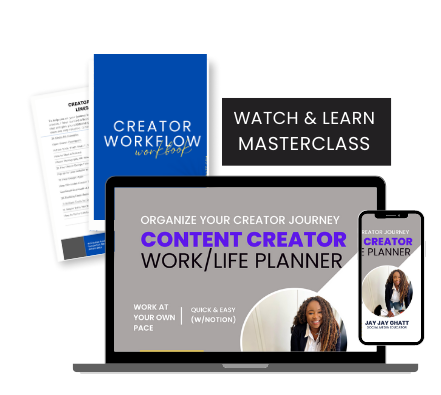
    To keep up with all of this, I highly recommend you get a good workflow system to help you keep track of your to-do list, your ideas, and each stage in the process from creation to marketing and promotion.

    There are various platforms that creators use such as Asana, ClickUp and more. I prefer Notion and actually sell a course where I take you behind the scenes of my own Notion set up for those who learn better by examples.

    Image on www.jayjay.com on Mastering the Art of Online Sales: A Step-by-Step Guide to Selling Digital Products and Services

    ENROLL IN MY WORKFLOW COURSE

    Selling digital products can be a great way to make money online.

    By following these tips, you can create a successful digital product business.

    Hope that was helpful!

    Until next time,

    Jay Jay Ghatt